The list of changes for the recently released Keynote 1.7 for iOS includes words to the effect that it now seems possible to import themes into Keynote. This makes it sound like you are no longer restricted to the 12 default themes that Keynote for iOS ships with.
As it turns out, this new feature is not quite what you think it is ...
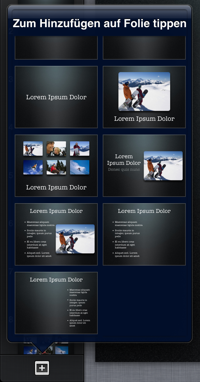 After unsuccessfully trying to figure out how to transfer a theme from my iMac to my iPad or finding any mention of that feature in the documentation (other than in the list of changes), I eventually came across a discussion on Apple's discussion forum that explained what this new feature is really about.
Turns out that if you import a presentation and then decide to add new slides to that same presentation, you can now select from the list of master slides of the themes that that presentation was based on (click on the [+] icon in bottom left). So the list of 12 themes in Keynote for iOS remains unchanged, it only makes adding new slides a little more comfortable.
In other words, the method described here is probably still the easiest way to create a presentation from a theme that's not among the 12 standard themes. Keynote 1.7 for iOS only saves you from doing the copying and pasting now.
Let's hope it doesn't take Apple another 2 years to add a proper import for themes ...
Please email me for details.
 "Importing themes into Keynote for iOS?" by Dirk Haun is licensed under a Creative Commons Attribution-ShareAlike 4.0 International Licence.
![[T]](/images/thestock/twitter.png)
![[Li]](/images/thestock/linkedin.png)
![[Cover: Presenting for Geeks]](/images/thestock/p4g-english-new.png)